Preview
Download (Excel / PDF)
| File | Version | Format | Size | Download |
|---|---|---|---|---|
| XLSXPersonal financial statement – Excel (formulas) | Blank | Excel (XLSX) | 6.5 KB | Download |
| PDFPersonal financial statement – printable PDF | Blank | 4.1 KB | Download | |
| DOCXPersonal financial statement – Word | Blank | Word (DOCX) | 37.0 KB | Download |
| XLSXFilled example – Excel | Example | Excel (XLSX) | 6.7 KB | Download |
| PDFFilled example – PDF | Example | 4.3 KB | Download |
How to fill it in (step by step)
- Date it. Use one "as of" date for every number, for example the last day of the month.
- Assets. Enter current market values, not purchase prices: bank balances from your latest statements, investment and retirement balances, your home's estimated value, and vehicles at private-party value.
- Liabilities. Enter the remaining balance of each debt — mortgage, auto loans, student loans, credit cards — not the monthly payment.
- Check net worth. The template subtracts total liabilities from total assets. A negative number is common early in a career or after buying a home.
- Income and expenses. Enter yearly amounts. The template shows annual cash flow and a debt-to-income ratio.
- Contingent liabilities. List loans you co-signed or guaranteed and any pending legal claims.
- Sign and date the printed version if a bank asks for it.
When banks ask for a personal financial statement
Lenders ask for one for small business loans (SBA loans require it from owners of 20% or more), commercial real estate loans, large personal loans and some lines of credit. Landlords for commercial leases, surety bond companies and investors may ask too. Banks use it to judge whether you could repay the loan from personal assets if the business struggles.
Example
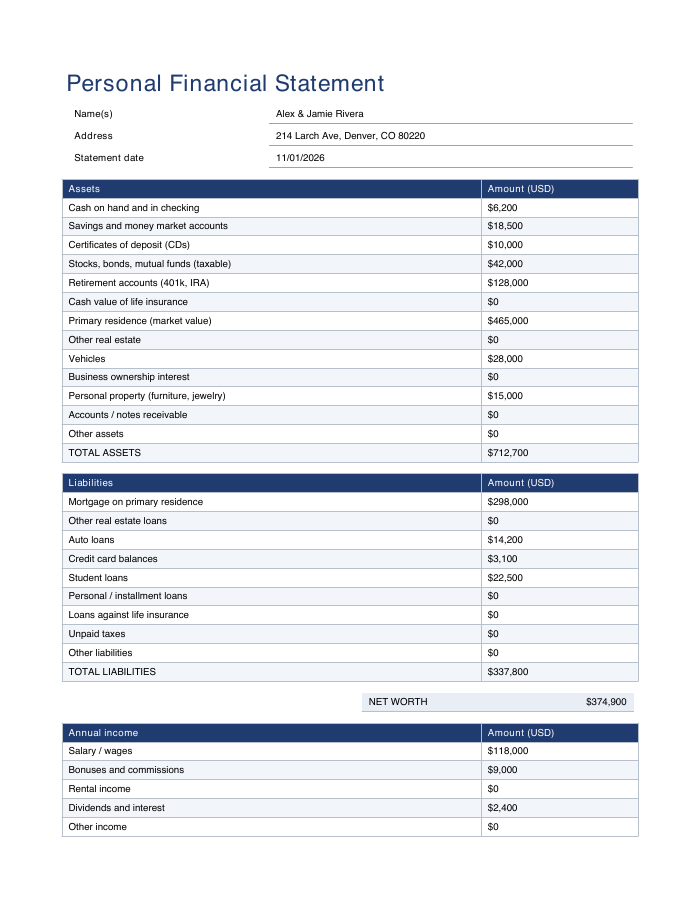
The example file shows a fictional couple with $712,700 in assets (including a $465,000 home and $128,000 in retirement accounts) and $337,800 in liabilities, for a net worth of $374,900.